
General information#
This part of the documentation contains how-to guides, including installation and usage.
Features#
Control panel in Plone registry to manage
AEMET settings.RestApi endpoint that exposes these
AEMET settingsfor Volto integration.RestApi endpoint that exposes the current weather forecast for the Location ID defined on the
AEMET settingscontrol panel.
Volto integration#
To use this product in Volto, your Volto project needs to include a new add-on: collective/volto-aemet
Translations#
This product has been translated into
English
Spanish
Compatibility#
Tested with Python 3.12 and Plone 6.1.5.
Install it#
Install collective.volto.aemet with pip:
pip install collective.volto.aemet
Enable it#
Go to the Site setup, next to the Add-ons control panel, find the collective.volto.aemet add-on and click on the Install button.
Setting it#
This integration uses the AEMET service called 'Predicción por municipios'
on its website. For example, for the every municipality:
'Sevilla (Sevilla)', it provides very detailed information on the weather forecast for this municipality. It also exports information in
XMLformat:https://www.aemet.es/xml/municipios/localidad_41091.xml
NOTE: The
XMLfile name has a prefix calledlocalidad_and a suffix with an ID. For example, the ID for the municipality of Seville is41091. This ID will be used later in theAEMET Settingscontrol panel.
To use this add-on, go to the Site setup, next to the Add-on Configuration icon, as shown below:
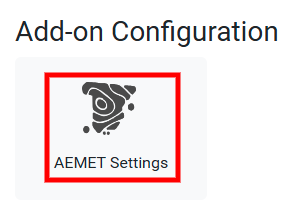
This AEMET Settings, you can access the control panel, as shown below:
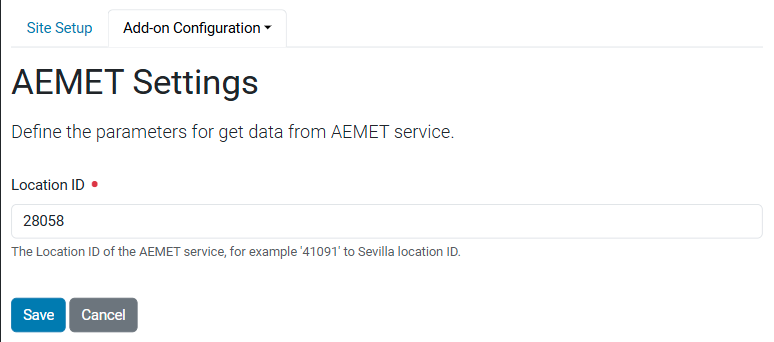
In this control panel, you can configure the following fields:
Location ID, The Location ID of theAEMETservice, for example '41091' to Sevilla location ID.
Use it#
To use the AEMET integration you need add the volto-aemet add-on, in your Volto project and
use the amazain features incluided.